This FAQ page addresses common technical issues you might encounter while using the platform. If you're having trouble joining a session, experiencing audio-visual problems, or dealing with performance issues, you'll find step-by-step solutions below. If your specific issue isn't covered here, please contact our team who will be happy to help (here)
Why can’t I join a Vedamo virtual classroom?
- Ensure your internet connection is stable and strong – carry out Vedamo’s connectivity check.
- If you are asked to login after clicking the session link, clear your browser history and then try accessing the link again.
- Verify that you are using a supported browser. Vedamo recommends the latest version of Google Chrome.
- Check if your firewall or antivirus is blocking access to Vedamo.
Why am I experiencing video problems?
- Confirm that your camera is properly connected and not being used by another application
- Allow the browser to access your camera.
- If using an external camera, make sure the device is plugged in correctly and is selected as the default input/output device in your system settings.
Why am I experiencing issues with my microphone?
- Ensure that you have enabled access to your microphone on your browser.
- If you are using an external headset, make sure that the device is plugged in properly and that it is not muted.
Why can’t I hear any audio during my session?
- If you are using a headset, ensure that it is properly connected to the correct audio port and the mute function is disabled.
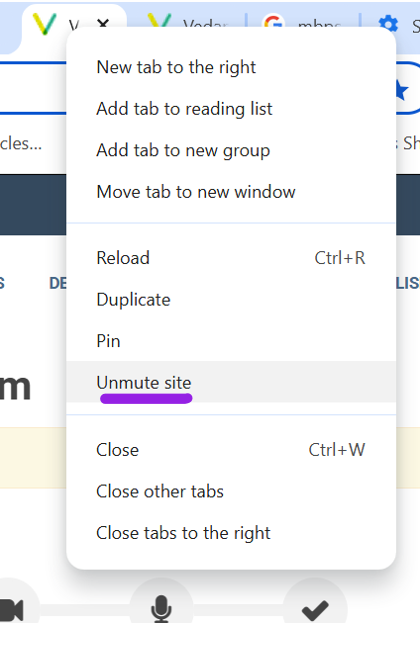
- Right click on the Vedamo tab and ensure that the site is not muted. If it is, you will see an option to unmute.

- In your system’s audio settings, find the sound section and check that the correct output device is selected as the default playback device.
Why is the virtual classroom running slowly?
- Vedamo recommends using a wired Ethernet connection when possible. A wired connection provides better stability and improves your virtual classroom experience.
- If you're using Wi-Fi, here are tips to improve your connection:
- Position yourself close to the router to receive a stronger, more stable Wi-Fi signal.
- Disconnect other devices (laptops, tablets, phones) from the network. Multiple connected devices share bandwidth, which can slow down the connection for everyone.
- Close unnecessary browser tabs and applications that use internet connectivity as these can reduce your connection speed.